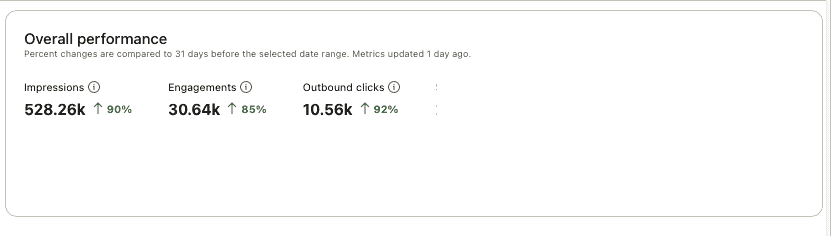
I've been meaning to "master" Pinterest for some time but never got round to devoting time to it. In 2025, I decided it was now or never so I invested in 6 different Pinterest courses (& masterminds) to learn all I can. Scroll down to see which is the best Pinterest course and the effect it had on my Pinterest outbound clicks.
Jump to:
After taking Cooking with Keywords, it's been almost 2 years since I did a blogging course review- not because I've not taken any- I've actually paid/ signed up for LOADS.
Rather, it's because I hadn't found any I found helpful and could genuinely recommend. (I've bought "recommended" courses before and found them c--p so I don't want my readers to ever feel that way- they may not always agree with me that XYZ course is the VERY best, but I hope they always agree with me that there's value in the course!)
Happily, that situation has now changed and I've found several useful courses for my blogs!
However, with Pinterest, it's definitely not a one-size-fits all approach- the best course for Person A may not be the best course for Person B- so scroll down to see what will be best for you! (Don't forget to read through to the end as I've saved 1 of my favorite Pinterest courses for the end!)
Note: With Pinterest "experts", I find that many of them have the same basic principles/ strategy. However, they vary in execution or tactics, so the "best" course for you would really depend on the type of learner you are, and what kind of teaching would suit you best.
Top Tips after Buying 7 Pinterest Resources
- Honestly, my top tip is to think about whether you're REALLY committed to making Pinterest work- this includes changing how you currently run your blog
I've had 1 blogging friend ask for my Pinterest course recommendation. However, I didn't give it to her despite the potential affiliate income, because I know she's doesn't truly believe in Pinterest and won't put in the work it needs.
This isn't a judgment though it may sound like one- I was doing something similar before I committed to Pinterest in 2025. If you're not willing to (potentially) change the way you currently blog, Pinterest may not be the best option for you.
2. Next think about your learning style.
Do you want someone to give you the skills to figure out the answer yourself, even if that means being inundated with technical data? Or do you want a more simplified approach where you're just told what to do (as much as is possible for Pinterest)?
Once you know the answer to this question, you'll know which Pinterest course is best for you!
Heather Farris: Pin Profit Academy
Best for people who:
- are looking for a Pinterest system
- are interested in running Pinterest ads
- want to be a Pinterest VA
- sell digital products (See "Cons" for who this is NOT for.)

I had not really heard of Heather Farris in my blogging Facebook groups, and feel she's a bit of a "hidden gem" (if you sell digital products.)
She's 1 of ONLY 6 Pinterest accredited Educators so you know that everything you learn from her is Pinterest approved and won't land you in spam. Her core product, the Pin Profit Academy, is the most value for money item on this list in that it covers the widest range of subjects for the lowest price- assuming you finish it within 1 month. (Not without its cons- more on this below)
It comprises a 1-on-1 call with Heather, Pinterest courses, templates, a Mastermind (with SEVERAL calls a month), and more! (In fact, it includes SO MUCH that I feel it really deserves its own review.)
Which means if you binge the content and cancel, you only pay $39 for several Pinterest courses, templates, live calls, and access to all the previous calls! (Heather has also said she wants to make it easy for people to leave if they need as she doesn't want to tie people in and hold them hostage.) However, there's SO MUCH content in the course that you'll definitely want to stay for longer.
In fact, Heather actually kindly offered me a 7 day free trial and I ended up staying for 3 months more. (I cancelled because I'm going away for 6 months to get content for tjtakesthetrain and alovelettertoasia, my England and Korean travel blogs, and won't have time.)
You also get a sort of direct line to Pinterest: for example, I had an issue with some of my pins getting marked as spam and I mentioned it to Heather so she kindly wrote in to her Pinterest contact. (Update: I did not hear back from her on my issues/ questions though...)
Pros
- Covers the widest range on this list: The Pin Profit Academy (PPA) includes Pinterest courses, a Pinterest system, 2 custom-built GPTs, monthly Pinterest templates, Facebook group, and several calls a month. The calls include question and answer sessions, and expert masterclasses. (Past expert-led sessions include ones on GA4, writing a welcome sequence for your email etc.) Even when Heather is on leave, she makes sure you are well taken care off by paying for someone else to lead the Q&A calls. However, too much content isn't always the best option: you will need a lot of time to sort through everything, including things that are not meant for you (e.g. information for digital product sellers and not so much for content creators.)
- Heather is organised: it is VERY clear when the Q&A calls will be, how to access old ones etc. (Unfortunately, this is not the case for all Masterminds- and I've taken part in several other paid ones!)
- Includes a Pinterest system which helps you keep track of your pinning: In fact, this is the creme de la creme of the PPA, in my opinion! If you've used Pinterest before, you'll know that whilst the basics are simple, the process can get quite overwhelming in terms of what to pin, when to pin, how often to pin etc- Heather's terrific system helps you keep on track. I previously spent 2 months designing my own system and, even then, I learnt something new from hers.
Cons
- Not for those who want to "game the system" so to speak: if you're looking for shortcuts and ways to outsmart Pinterest, this is not the course for you as Heather teaches according to Pinterest's official best practices. If you're more advanced with Pinterest or skeptical about some of Pinterest's official advices, you may not be able to get the answers you need. I've asked a few questions that I felt I didn't really get an answer to.
- Even though Heather is organised, the PPA can get quite overwhelming as there is just SO MUCH CONTENT. The content needs some re-organization.
- Because the Mastermind covers more than Pinterest, we don't go very deep on Pinterest itself compared to 2 of the other courses/ masterminds below. (This obviously is a reflection of who was on the Mastermind calls at that time, but most of the Pinterest questions covered were for people who had just started a Pinterest account.) I think this works for digital product sellers because you don't need a lot of clicks to earn, if your product has a good profit margin. However, for bloggers, we need A LOT of clicks to make money!
- If you're a pure-blogger (i.e. you only publish content and don't sell anything), parts of the PPA are confusing as Heather refers to products a lot. Running a business is at the heart of everything Heather teaches (However, I do think bloggers all need to eventually start selling digital products.)
- The members of the Facebook group are not super active but Heather (or 1 of her team) almost always answer your posts. You don't get much of a community feel in the group.
Note: In PPA, Heather doesn't refer to coding or the Pinterest Engineering blog but I know she reads it as I've heard her mentioned the findings in the earlier videos.
Carly Campbell
Best for people who want:
- a LOT of effective Pinterest templates -> her templates make up most of my Top10 pins. They're very "Pinterest-y"
- an affordable course (Carly's Mastermind is 1 of my 2 favorite Pinterest investments- and VERY reasonably priced compared to some of the other masterminds on this list. She also gives you feedback on your account in the Mastermind so there's like a small free audit.)
- and/or access to someone with a very, very deep knowledge of Pinterest AND don't mind a more rambling approach (my Pinterest stats went up immediately after I applied Carly's tips)
- The Mastermind has a great community! Carly is VERY generous with her knowledge and not everything is an upsell. For example, someone asked about pinning for travel, and Carly sent her an almost 1-hour video on the topic for free!
Carly's Pinterest course "Pinteresting Strategies" is probably the most famous Pinterest course on the list.

I actually didn't get Pinteresting Strategies as I had already taken a different one and was still waiting to see if those strategies worked. (And, to be honest, I was a bit hesitant because she is always promoting Tony Hill. I think he's super intelligent, but since she was promoting him, I wasn't sure if I should get his or her course.)
Based on the recommendation of another blogger, I signed up for Carly's Pinterest Mastermind instead. In the Mastermind, there is a (sort-of) monthly call and you get templates sent to you (almost) every month. (More on why I say "sort-of" and "almost" below.)
After taking the Mastermind, I was so in awe of her intelligence that I REALLY wished I had taken her course first- it's very affordable ($97) and very recently updated in 2025!
(I felt a bit constrained about what kind of questions I could ask as I didn't want to be inadvertently ask questions already covered in the Pinteresting course- NOT because she made me feel that way as she's super nice! When I have some spare blogging income, I'm definitely going to purchase her course.)
Pros
- Carly is VERY knowledgeable: I was honestly in awe of how intelligent and knowledgeable about Pinterest she is. Even though I had taken a Pinterest course before signing up for the Mastermind, I learnt a lot of new Pinterest knowledge from her and saw an almost immediate boost in my Pinterest outbound clicks after applying them.
- In addition, the pins made with her templates were amongst my Top10 in just 1 month! (1 year on, and after using templates from 2 other experts, her templates are still amongst my Top10 pins.)
- Pinterest changes a lot but you know Carly's knowledge is up to date: she monetised a new food blog in a mere few months at the end of 2025 (by getting it on Journey- it is now on Mediavine.) Her food account had 10 m views in Dec 2025! (I know cuz I snoop :P)
- And she's monetised yet another site in 2025!
- She's also super nice! She has both a free & paid Facebook group (the paid one is for Mastermind members only) and I've not noticed any difference in how much she replies to the groups' questions. Both groups are also amongst the most active Pinterest Facebook groups that I know of.
- You get several short and several long Pinterest templates every month (as well as access to ALL the previous templates she's sent out) It can be fiddly to use her templates- they're attractive but have many elements to adjust. However, they're effective: 50% of my Top10 pins are using Carly's templates.
- Besides the templates, the Mastermind also comes with an account audit. Even though it was not my 1st Pinterest audit, I found Carly's feedback very helpful. Applying her feedback to a specific pin helped me increase the impressions by 10x!
Cons
- The Mastermind is paid for quarterly, so it's a 3 month commitment.
- I mean this in the politest way possible, but in Carly's own words: she rambles. A lot. I personally am not the most attentive student, so it was VERY hard for me to follow the calls.
- (Update: Carly now has a portal so all the information can be easily found in 1 place- YAY!) The way everything is set up was confusing for me: I was actually not sure how to sign up from the start, so that should have been a sign! I was also never sure when the Masterminds would be, or where we could find the replays, or even if they were being held. (Carly was on holiday sometimes, something I totally understand, but I just couldn't keep track of whether there was a call or not!) I also find the timings impossible to make, living in Asia, and although Carly did say we could send in questions beforehand, I never did as I didn't know when the calls were going to be held.
- To get the most value from the Mastermind, I think you'll need to be an organised person so you can track when the calls are being held and prepare your questions beforehand
As you can see, the cons are only around the organization, and not the breadth and depth of Pinterest content. Basically, I found Carly's course best for someone who wants to understand how Pinterest works and is very organised, so does not need to be taught a system. (Or someone who has just started blogging, so doesn't have a lot of content/ pins to get their head around.)
For those of us who have been blogging for a while, and need a structure to organize our Pinterest work/ help us best analyse our Pinterest results, scroll down to the end of the list for my Amy Le Blanc Pinterest course review.
Jumpstart Your Pinterest
Best for: bloggers who have just started pinning and want a "done-for-you" approach

Pros
- Allison has a Pinterest agency so she's experienced in multiple niches: she has many loyal fans and 2 Facebook groups. (One is free and the other is for her Mastermind members only.)
- Jumpstart Your Pinterest is a little like having your Pinterest account managed for you: For example, Allison includes keyword research she has done for various niches. (Click here for a detailed review of the Pinterest course.)
- She includes a Pinterest audit
- Jumpstart Your Pinterest is easy to understand- it doesn't refer to the coding or the Pinterest Engineering blog
Cons
- The course is not updated as often as some of the other courses on this list. I highly recommend signing up for Amy's newsletters as they're the most timely Pinterest updates that I know of (More on Amy's course below- for a full review of Amy Le Blanc's Pinterest course, click here.)
- Not so suitable for people who've been pinning for a while (in my humble opinion.)
She also doesn't go into technical stuff so this may be better for people who go to sleep at the thought of coding. (Personally, I'm not tech-savvy but I'm big on data so I like the coding bits in the courses 🙂 It helps me know whether I'm on the right track!)
Stupid Simple Blogging
Best for: someone who wants to learn a range of blogging skills, but not for just Pinterest
Mike is famous in the blogging world for his Google SEO course: Stupid Simple SEO. A while back, he started experimenting with Pinterest and managed to get a ton of outbound clicks. I was so intrigued by his success that I decided to sign up for his new blogging course.
Pros
- Stupid Simple Blogging is, well not to be obvious, but a blogging course: it not only touches on Pinterest, but also email, Facebook, custom GPTs etc
- Mike is very on-the-ball: people who buy the course get access to his (very active) Facebook group where he does monthly live calls. If you ask questions in the group, he responds quickly (via a Loom video.)
- I think I'll save the specifics for a in-depth SSB review so that I can do it more justice.
Cons
- I'll be honest- whilst I would recommend Stupid Simple Blogging as general blogging course, this would NOT be my recommendation if you're looking only for a Pinterest resource (It's not as in-depth as some of the other courses on this list. In addition, I wonder if his pinning strategies work better for people who have VAs vs the one-man shows that most bloggers are.)
- Lots of tiny modules, so you have to keep clicking which can be time-consuming if your computer is as slow as mine
- Sound can be on and off
Amy LeBlanc

Best for: anyone who wants to go very deep into Pinterest knowledge
I loved Amy's courses so much, I BOUGHT 3 of her products:
- Scheduling Shortcuts (her signature course- for a full review of Amy Le Blanc's Pinterest course, click here.
- Rank Boost 2.0 (for Pinterest SEO)
- Pinterest Mastermind (open only to students of Scheduling Shortcuts.)

She is SO knowledgeable, organised, and data driven!
Pros
- Amy's course gave me enough knowledge and made things clear enough, that I had the interest & confidence that I could master Pinterest. (Previously, I'd written Pinterest off as too "fluffy". For a full review of Scheduling Shortcuts, click here.)
- Everything is data-driven: she refers to the Pinterest Engineering blog, checking the source code, and Pinterest experiments she's done
- One experiment was even run for a year!
- Although she says it will take 3-6 months to see results, my Pinterest stats went up within 1 month!
- She updates Scheduling Shortcuts frequently (the updates are shared with Mastermind members first, then on the course later, but it's still the most timely)
- She shows you how to DIY so you can save money: for example, she shows you how you can get by without using a service like Hubbub or WP Tasty. In her Pinterest course, she also shows you how to do the same thing using the (free) Pinterest Native scheduler as well as a paid service.
- She is super organised, detailed, and on the ball. Before I signed up for her Mastermind, I emailed her with a Pinterest question (basically about disappearing keywords) which she solved for me in 24 Hours! I had asked the same question in several other groups, all of whom said they had not seen the issue (so I didn't get an answer)- Amy was the one who "solved" it for me!
- And, did I mention, she's a FULLY BOOKED UP Pinterest manager? (So experienced in several niches)

Cons
- Like all courses with lots of information, Scheduling Shortcuts can get a bit overwhelming. Because there are sometimes so many updates, listed as Update 1, Update 2 etc, a new student can get confused. (Amy did mention she is thinking of re-filming the course, so hopefully it's more straightforward in the future.)
Whilst Amy gave a timeline of 3-6 months before we see an effect from Scheduling Shortcuts on our outbound clicks, my analytics have been increasing every month since I applied her teachings. Not by a ton, but it's moving in the right direction, and I'm typically flat or down at this time of the year.
Hopefully you've found these reviews of Pinterest courses useful- If you need more in-depth information on any of them, let me know in the comments and I might do a standalone review where I can go into more detail!

Lauren says
thanks for this post!! i'll definitely check these out 🙂
Zen says
Thanks Lauren, hope you find a Pinterest course that suits you!